Claude Code guide
How to make a Claude Code statusline.
A Claude Code statusline is a small command that turns your session into the line at the bottom of the terminal. Here is how to make one three ways, how to install it, and how to fix it when it stays blank.
Updated September 29, 2026 · 9 min read
Open the Claude Code statusline builder
What a Claude Code statusline actually is
Claude Code can show a customizable bar at the bottom of the terminal. Its documentation calls it the statusline; many developers search for it as a status line or a status bar. All three names mean the same feature.
It is not a widget with fixed options. It is a command you configure. Claude Code starts that command, writes the current session as JSON to its standard input, reads what it prints on standard output, and draws the result. Anything a shell script can work out (a git branch, a context budget, a cost estimate) can go on the line.
The whole contract: session JSON goes in, styled text comes out. Everything in between is your script.
The command runs locally on your machine, so running it spends no API tokens. Claude Code does not call it constantly; it refreshes after each assistant message and on a few other events (details below).
Three ways to make one
Pick by how much control you want and how much you enjoy shell quoting. They all end up as the same thing: a script plus a statusLine entry in settings.
| /statusline command | statusline.sh builder | Write it by hand | |
|---|---|---|---|
| Effort | One sentence in Claude Code | Point, click, run one command | A script plus a settings edit |
| See it before it's live | No: it goes live, then you look | Yes, live preview with mock sessions | Only if you pipe test JSON yourself |
| Same result every time | Depends on what the model writes | Yes, generated from your design | Yes, it's your code |
| Share or reuse it | Copy the script file | Publish a design, fork others | Copy the script file |
| Best for | A quick one-off tweak | Polished, shareable designs | Custom logic: APIs, files, other tools |
Build one visually in six steps
Open the builder and pick a starting point
Open the Claude Code statusline builder. Start from a blank canvas or fork a template such as Minimal, Verbose Dev, Two-Line Cockpit or Powerline. The screenshots below use Verbose Dev.
Add elements from the Elements drawer
The drawer at the bottom of the canvas groups elements into Identity, Git, Context, Session, Rate limits, Text and Layout. Click one to add it, or drag it onto the canvas. Drag chips left or right to reorder them.
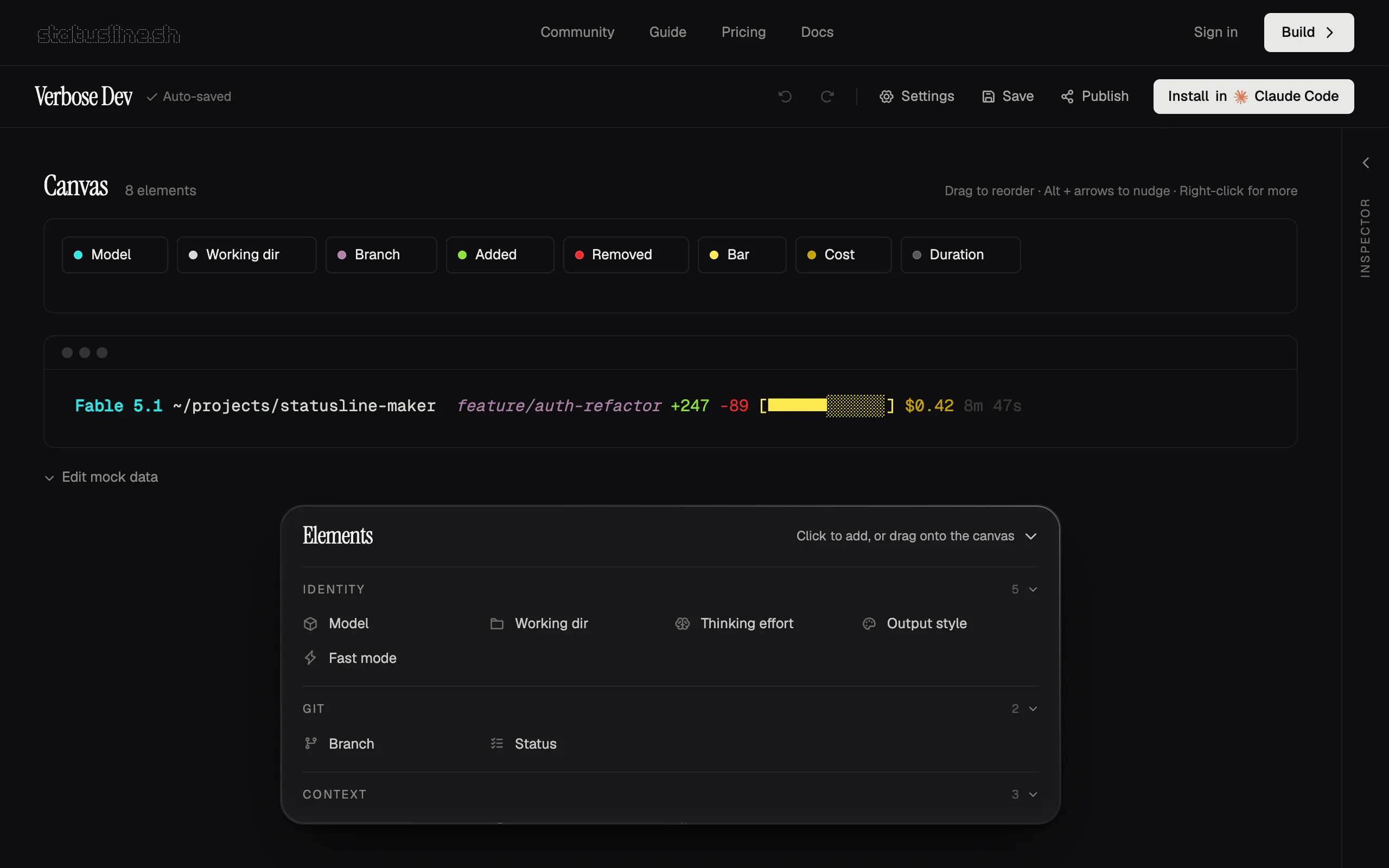
The builder with the Verbose Dev template loaded. The canvas holds your elements, the terminal frame is the live preview, and the Elements drawer lists everything you can add. - Canvas: one chip per element. Drag to reorder.
- Live preview of the exact terminal output.
- Elements drawer: click to add, or drag onto the canvas.
- Install in Claude Code opens the install dialog.
Style each element in the Inspector
Click a chip and the Inspector opens on the right. Content controls what is shown (precision, prefix, suffix, max length). Appearance sets foreground and background color. Decorations toggles bold, italic, dim and underline, and Visibility hides an element until a condition is true.
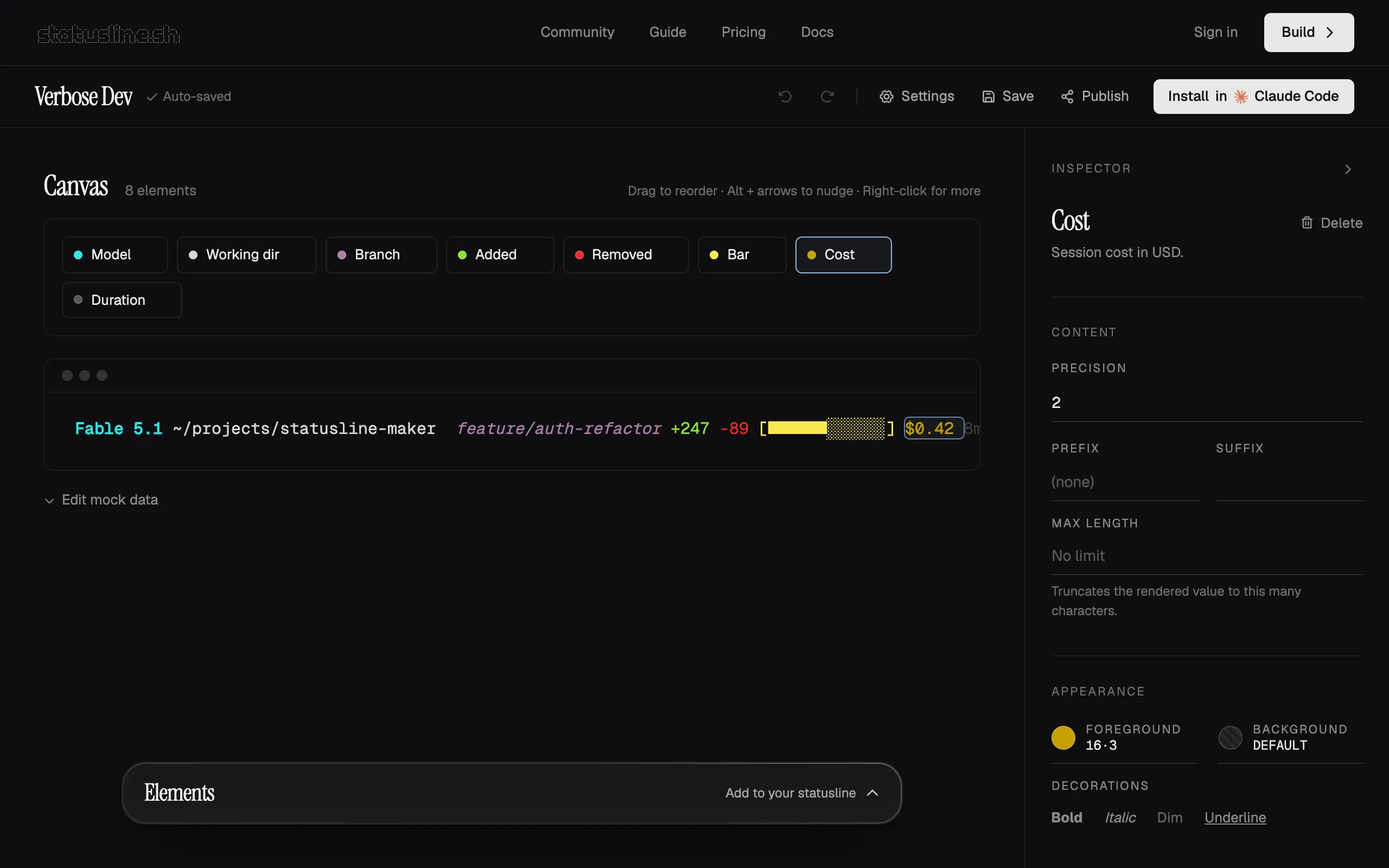
Select a chip and the Inspector shows only the controls that element supports. Here the Cost element is selected, and its highlighted value updates in the preview as you change it. - The selected element on the canvas.
- Content: precision, prefix, suffix and max length.
- Appearance: foreground and background color.
- Decorations: bold, italic, dim and underline.
Check the live preview
The terminal frame under the canvas re-renders on every change, using the same interpreter that generates the installed script. Open Edit mock data to try a fresh session, a deep one near the context limit, or a folder without git.
Install with one command
Click Install in Claude Code, choose macOS, Linux or Windows, copy the command and run it in a terminal.
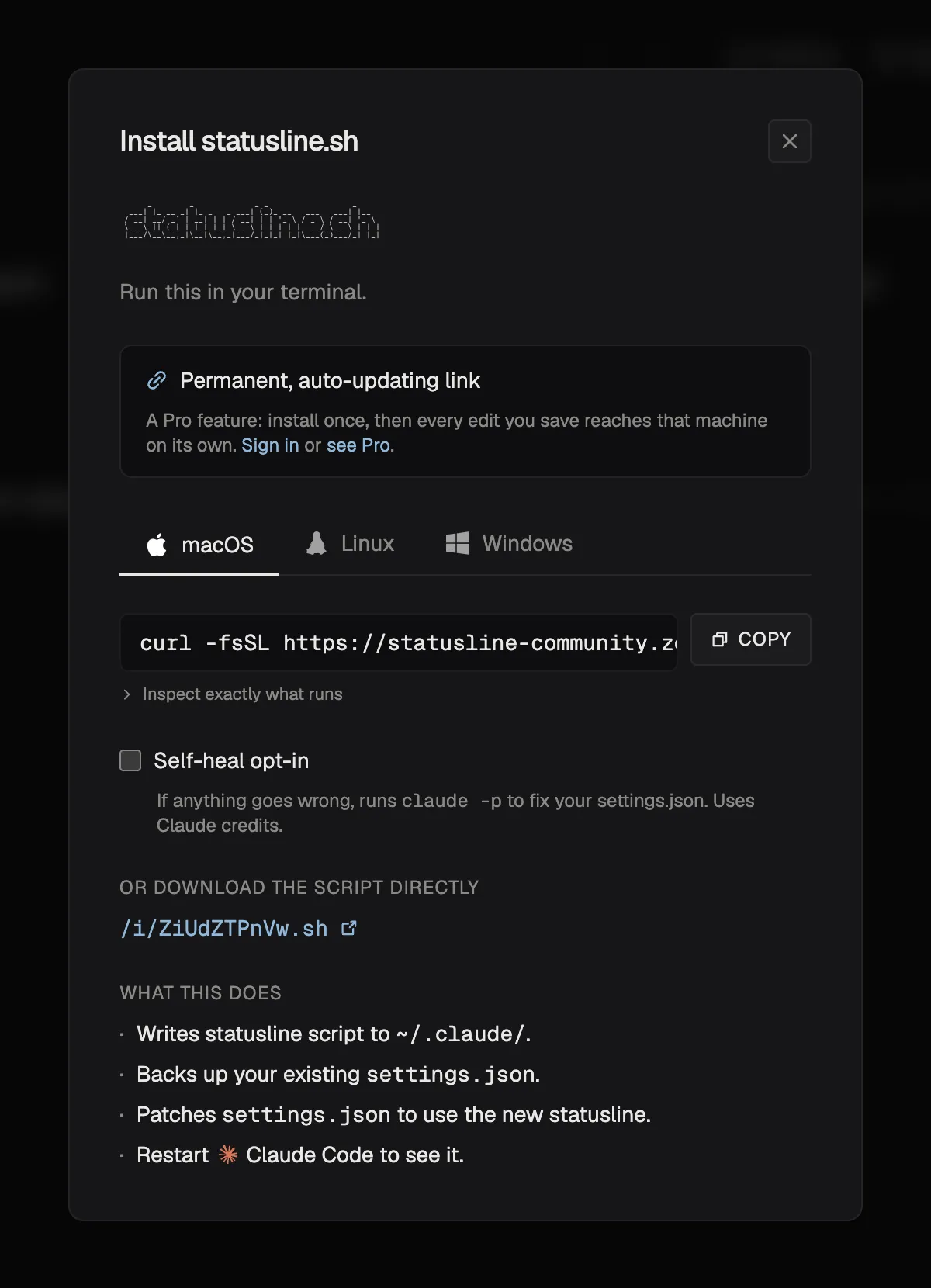
The install dialog. Pick your operating system, copy the command, and run it in a terminal. (Screenshot from a local build, with the install host shortened for display.) - Tabs for macOS, Linux and Windows.
- The one-line install command, with a copy button.
- Inspect exactly what runs before you run it.
- Self-heal is opt-in and off by default.
- A plain-language summary of what the installer changes.
Optional: save or publish it
Publish adds the design to the community gallery under your name so others can preview and fork it. Published designs cannot be edited or removed, so use Export JSON first if you want a copy.
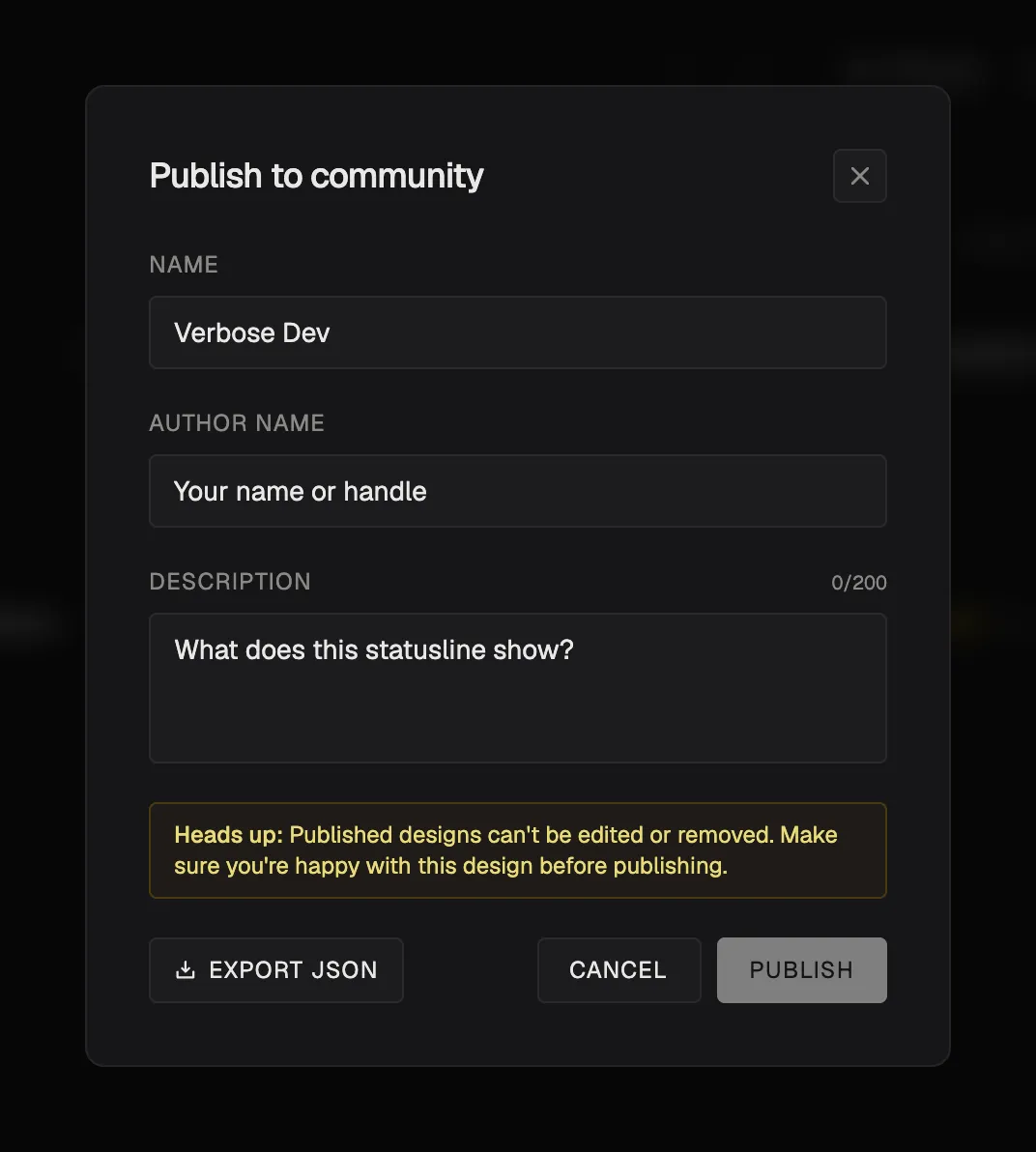
Publishing is optional. Note the warning: a published design can't be edited or removed, so use Export JSON first if you want a copy.
What the installer does, and how to check it
The generated command downloads a self-contained installer and runs it. You can read it first: the dialog's Inspect exactly what runs link shows it, and the same script is served at a plain URL if you would rather download it and run it yourself.
- Writes your statusline script to
~/.claude/statusline.sh(statusline.ps1on Windows). - Saves a timestamped backup of
~/.claude/settings.jsonnext to it before changing anything. - Merges the
statusLineentry into the JSON structurally, so every other key (model, permissions, MCP servers) survives. - Points
commandat the script's absolute path.
Claude Code reloads settings when the file changes, so the new line normally appears on your next interaction. The installer still tells you to restart Claude Code, which is the safe fallback if nothing shows up. To remove the statusline, delete the statusLine key from your settings (or ask Claude Code to remove it with /statusline).
Statusline examples to steal from
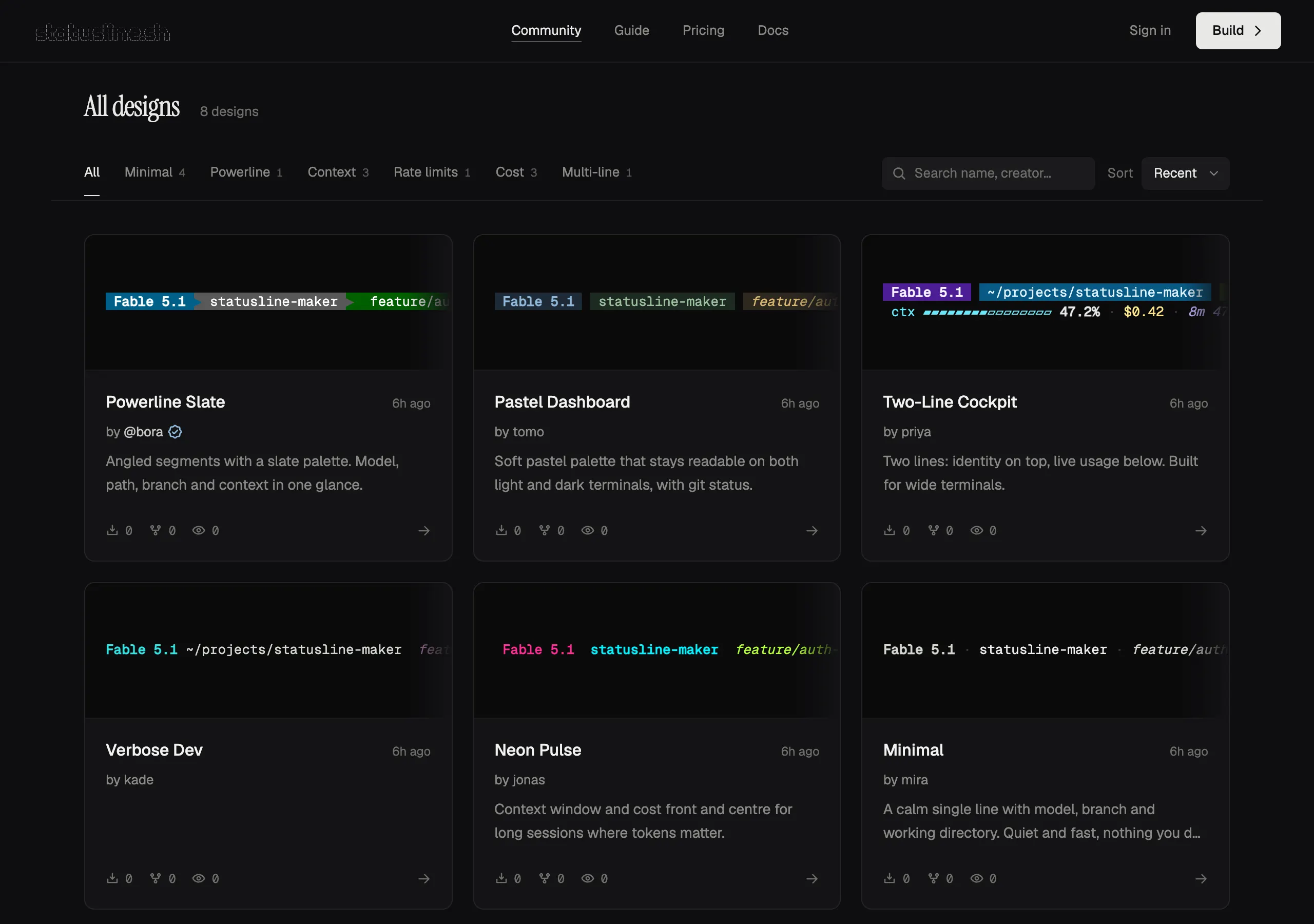
Every line below is rendered live in your browser by the same engine that produces the installed script. These are real ANSI colors from mock session data, not screenshots. Switch the design and the session to watch colors react to context, cost and git state.
The community gallery has more designs, each with a live preview and a one-command install. Fork any of them into the builder and change what you don't like.
Add one thing at a time
Once the basics work, add the pieces you actually glance at during a long session. Each guide has a live preview and the element settings that matter.
- Git branch: Show which branch you are on, with a dirty marker.
- Context and token usage: A bar or percentage that changes color as the window fills.
- Session cost: The running dollar cost, at the precision you choose.
- Model name: Always know which model is answering.
- Session duration: Elapsed time, human-readable or HH:MM:SS.
- Rate limits: 5-hour and 7-day usage for Pro and Max plans.
Write one by hand
You do not need the builder to make a statusline. You need a script that reads JSON on stdin and prints text. This bash version uses jq and shows the model, the folder, and how full the context window is.
Make it executable and test it with sample JSON before Claude Code ever runs it. It should print the bold model name, my-project, and a dim 47% ctx. Running it with no piped input just waits for stdin.
Then point Claude Code at it. Back up ~/.claude/settings.json and merge this entry into it, keeping your other settings.
Optional keys on statusLine: padding adds horizontal padding, and refreshInterval re-runs the command on a timer (in seconds, minimum 1), which suits clocks or anything that changes between messages. Print several lines and each becomes its own row.
The hardest part of doing this by hand is the escape codes. Try them here: toggle a style or pick a color and the generated sequence updates underneath.
The JSON Claude Code sends your script
Every run receives one JSON object on stdin. Pick a field to see a realistic value and the jq expression that reads it, then switch the session to watch the values change.
Show every field as a table
| Field | What it holds | Watch out for |
|---|---|---|
model.display_name | Human-readable model name. | model.id has the machine-readable id. |
workspace.current_dir | Directory Claude Code is working in. | cwd holds the same value. workspace.project_dir is where it was launched. |
workspace.git_worktree | Name of the linked git worktree, when there is one. | This is not the branch. Run git branch --show-current for that. |
cost.total_cost_usd | Estimated session cost in US dollars. | A float. Format it with printf '%.2f'. |
cost.total_duration_ms | Wall-clock milliseconds since the session started. | Divide by 1000 for seconds. |
cost.total_lines_added | Lines of code added this session (total_lines_removed for removed). | Integers, zero in a fresh session. |
context_window.used_percentage | Share of the context window used, 0 to 100. | Can be null early in a session. Always give jq a default. |
context_window.context_window_size | Size of the model's context window in tokens. | Pair it with the percentage to show tokens used. |
rate_limits.five_hour.used_percentage | Percent of the 5-hour rate-limit window used (seven_day for the weekly one). | Only present on Pro and Max plans, after the first API response. |
effort.level | Current reasoning effort level. | Missing for models without an effort setting. |
output_style.name | Name of the active output style. | Default sessions report the default style. |
session_id | Unique id of the session. version holds the Claude Code version. | Handy as a cache key for slow lookups. |
This is a subset. Claude Code adds fields over time, so check the official statusline documentation for the full current list.
When the statusline refreshes
Claude Code re-runs your command when something worth showing has changed:
- After each new assistant message, and after
/compact. - When the permission mode changes or vim mode is toggled.
- When the
commandin your settings changes. - On a timer, if you set
refreshInterval. - When a rate-limit window resets or the prompt cache expires.
Updates are debounced by roughly 300 ms, and a run still in flight is cancelled when a newer update starts. Keep the script fast, and cache anything slow such as a network call. Claude Code notifications share the row, so a very long line can get truncated.
Windows: Git Bash or PowerShell
On Windows, Claude Code runs the statusline command through Git Bash when it is installed and PowerShell otherwise. Use forward slashes in the command path; ~ works too.
The easy route is the builder's Windows tab: it writes a PowerShell script and the matching settings entry for you with irm … | iex, and keeps the rest of your settings intact.
Troubleshooting a blank or broken statusline
| Symptom | Likely cause | Fix |
|---|---|---|
| Nothing appears | No statusLine entry in the settings file Claude Code reads, or the workspace is not trusted. | Check ~/.claude/settings.json. Accept the workspace trust prompt. Settings such as disableAllHooks also switch the statusline off. |
| The line is blank | The script printed nothing, or exited with a non-zero code. | Run it with sample JSON and check echo $?. Print to stdout, not stderr. |
| Permission denied | The script is not executable. | chmod +x ~/.claude/statusline.sh |
It shows null or a wrong 0% | The field was null early in the session. | Give the jq read a default such as // 0. |
Raw text like \033[1m appears | Escape codes were printed literally. | Print with printf (or echo -e) so the escapes are interpreted. |
| It works in your shell but not in Claude Code | Different PATH or environment, for example jq not found. | Use absolute paths. Run claude --debug to see the command's stderr. |
| The line is cut off | A notification shares the row, or the terminal is narrow. | Shorten the line, or print a second row. |
Frequently asked questions
Is it called a statusline, a status line or a status bar?
Claude Code's documentation says statusline. Developers also search for status line and status bar. They all describe the same feature: the customizable line at the bottom of the Claude Code terminal.
How do I set up a Claude Code statusline?
Add a statusLine entry of type command to ~/.claude/settings.json that points at a script. You can write the script yourself, ask Claude Code to write it with /statusline, or design one in the statusline.sh builder and run its one-line install command.
Does a statusline use tokens or cost money?
Running one does not. The command executes locally on your machine and never calls the API. Asking Claude Code to write one with /statusline is an ordinary request, so that step uses tokens like any other prompt.
Where is the statusline configured?
In settings.json under the statusLine key. ~/.claude/settings.json applies to all your projects. The value is an object with type set to command and a command that is a script path or an inline command.
Does it work on Windows?
Yes. Claude Code runs the command through Git Bash when it is installed and PowerShell otherwise. The builder's Windows tab installs a PowerShell script and the matching settings entry for you.
Why is my statusline blank?
Usually the script printed nothing, exited with an error, or is not executable. Pipe sample JSON into it, check the exit code, run chmod +x, and give every jq read a default. The troubleshooting table above covers the rest.
How often does the statusline update?
After each assistant message and a handful of other events, debounced by roughly 300 ms. Set refreshInterval if you also want it to re-run on a timer.
Can I share or reuse a statusline?
Yes. Publish a design from the builder to the community gallery, where anyone can preview it, install it or fork it. You can also copy your script file to another machine.
Keep reading
- The /statusline command: What Claude Code's built-in command writes, and when to skip it.
- Community designs: Live previews you can install or fork.
- Show context usage: A bar that warns before you hit the limit.
- Show the git branch: Branch name plus a dirty marker.
Make yours in about five minutes.
Start from a template or a blank canvas, watch the preview update as you go, and install with one command.